
On this pageAI stack
  1. AI stack
  2. Where it runs
  3. Architecture
  4. Core properties
  5. Document tree
  6. Import
  7. Models
  8. Open Knowledge Format
  9. API reference
  10. Frequently asked
  11. Keep reading
  12. Don't believe us. Test it.

Developers

How it works

What happens when you import a document, how a question finds its passage, which models write the answers and how your documents are stored. You connect over MCP or the API, and people use the same wiki in the web app.

Overview

Where Hippocampus sits in an AI stack

Models reason, agents act and people decide. Between them and a company's documents sits Hippocampus: its services ingest, curate and retrieve, and its secure OKF wiki keeps every document as encrypted Markdown behind one set of APIs.

Identity and keys

Identity provider SSO on Corporate auth live
KMS root keys stay inside encryption keys live

Where knowledge lives

Corporate DMS Your drives and document systems connectors live

Hippocampus

Thalius services IngestCurateRetrieve
Secure OKF wiki
APIsHTTP · MCP · REST
↕ cleartext
Doc vault
↔authz
Knowledge vault
↕ encrypted
Markdown storage

Who asks

MCP live Claude Code and coding agents
MCP live AI agents any framework
MCP live Chat assistants Claude, ChatGPT
REST live Apps and scripts your own code
web app live People browse, check, ask

Models it calls

model calls live AI services any language model
The blue box is what Hippocampus runs: Markdown is stored only encrypted, and the doc vault hands cleartext to the APIs alone. Everything around it stays yours or your provider's. Each line names what travels on it; dashed means not built yet, beta works today and is being completed.

Where it runs

Hippocampus runs on our cloud or on your own hosting. The product is the same in both.

Hippocampus cloud
Hosted and run by us in the EU. Sign up, then connect your AI tools over MCP or your own code through the API.
Own hosting
Your own cloud, on-premises or any other environment you control. Part of the Corporate package.

The API and MCP are identical on both. Only the base URL differs.

Own hosting is set up with us as part of Corporate: talk to us about Corporate

Architecture

A layered memory

A new mental function for LLMs: an external, layered memory that AI creates and maintains, shared with the people who use it.

Hippocampus gives AI and people one shared, well-organised memory. It is built like an encyclopedia: complex documents are summarised into short abstracts with deep links to the text they stand for.

The memory is hypertext, which is a core competence of LLMs. LLMs create and maintain it as a modern wiki, and the same pages are the ones people browse and check.

The search starts from titles and links. It follows a link to a summary when a title matters, and opens the full text only for the passage the question needs, without a generative model. The model receives only that passage, so the context stays small however large the corpus grows.

The external mind palace: context window, summaries, full textThe context window holds only the titles Data processing agreement and Employee handbook as links, and the prompt. The title Data processing agreement is followed to its summary, and a deep link in the summary is followed to one passage of the full text. The other document is not opened.CONTEXT WINDOWData processing agreementtitle · linkEmployee handbooktitle · linkpromptHow is personal dataencrypted at rest?Data processing agreementsummary · deep links1 Definitions2 Processing3 Security measures → 3.1 Encryption4 Sub-processorsData processing agreementfull text · Markdown3.1 Encryption · p. 7Employee handbooksummary · deep links1 Working hours2 Leave3 Equipment4 ConductEmployee handbookfull text · Markdown
CONTEXT WINDOW
Data processing agreement title · link
Employee handbook title · link
prompt How is personal dataencrypted at rest?
Data processing agreement summary · deep links 1 Definitions2 Processing3 Security measures → 3.1 Encryption4 Sub-processors
Employee handbook summary · deep links 1 Working hours2 Leave3 Equipment4 Conduct
Data processing agreement full text · Markdown 3.1 Encryption · p. 7
Employee handbook full text · Markdown
  1. 1
    Titles and linksOne line per document or section, each one a link.Where the search starts.
  2. 2
    SummariesShort abstracts with deep links into the text.Opened by the search when a title matters for the question.
  3. 3
    Full textThe document as Markdown, with its pages and byte ranges.Opened only for the passage the answer needs.

Illustrative documents. The search path is drawn in blue; the dashed document was listed in the index but never opened.

Core properties

  • Scalable to huge datasetsThe model gets a small, relevant context: only the passages that matter, found by the search, rather than the corpus. The size of the corpus stops being the limit.
  • Built-in quality controlQuality control is part of the memory, not a separate project, and every summary can be rebuilt from the source.
  • Open by designAnswers are traceable and accountable: each one leads back to the passage, the page and the original file it came from.
  • Human in the loopPeople work in the same wiki the AI builds. They browse it and check it, and cases that need judgement are sent to a person: a core feature, not an afterthought.
  • Role-based securityAccess follows roles and permissions, so what an answer is built from is limited to what the person or agent asking may read.

Document tree

Here is the search on one document. Two funnels run over the tree built at import: one walks down from the index summary through the section summaries that match the question, the other searches the leaf sections directly with keywords and embeddings. Their results are fused into one ranking, without a generative model.

Question “How is personal data encrypted at rest?” over Data processing agreement.pdf
Document tree of Data processing agreement.pdfAn index summary, 4 section summaries and 4 leaf sections. The top-down path for the question runs through 3 Security measures, then 3.1 Encryption.Data processing agreementindex summary · pp. 1–141 Definitionssummary · pp. 1–22 Processingsummary · pp. 3–53 Security measuressummary · pp. 6–94 Sub-processorssummary · pp. 10–143.1 Encryptionp. 7bytes [18240, 19012)13.2 Access controlp. 8bytes [19012, 20330)3.3 Incidentsp. 9bytes [20330, 21104)4.1 Sub-processorsp. 10bytes [26410, 27388)2
  • Data processing agreement index summary · pp. 1–14
    • 1 Definitions summary · pp. 1–2
    • 2 Processing summary · pp. 3–5
    • 3 Security measures summary · pp. 6–9
      • 3.1 Encryption p. 7 bytes [18240, 19012) 1
      • 3.2 Access control p. 8 bytes [19012, 20330)
      • 3.3 Incidents p. 9 bytes [20330, 21104)
    • 4 Sub-processors summary · pp. 10–14
      • 4.1 Sub-processors p. 10 bytes [26410, 27388) 2
Top-down: the path through the summaries Bottom-up: keyword and embedding hits on leaf sections
  1. 1 3.1 Encryption p. 7 · bytes [18240, 19012)
    Reached by both funnels: the path through 3 Security measures and the leaf search.
  2. 2 4.1 Sub-processors p. 10 · bytes [26410, 27388)
    Leaf search only: the passage names the processor's hosting provider.

Illustrative document and offsets. The fused ranking is what search returns; the answer is composed from those passages.

Import

FileWhat happens
.pdfText recognition with page markers, so scanned pages work. The original is kept.
.docxConverted to Markdown directly, without text recognition.
.md · .markdown · .txt · .textRead as-is with page markers added. There is no PDF original for these.

A file that was already imported is flagged as a duplicate. Progress can stream while the document is read.

Models

Answer models
Any language model. You choose which model answers, set for each workspace; on Corporate you can use your own model key. In the web chat a person can pick the model per question. Changing the answer model needs no re-import.
Embeddings
Fixed for a workspace: changing the embedding model would invalidate the stored vectors, so it is not offered.
Model access
Included in the service. No provider account and no provider key to set up.

Open Knowledge Format

Every document is stored as a folder of Markdown with YAML front matter, following the Open Knowledge Format specification: a summary of the whole document, the full text, the original file, and a folder per section down to the leaf sections. Any document's Markdown can be read through the API.

Layout
contracts/
└── data-processing-agreement/
    ├── index.md                        summary of the whole document
    ├── data-processing-agreement.md    full text as Markdown
    ├── data-processing-agreement.pdf   the original (none for .md or .txt uploads)
    └── 03-security-measures/
        ├── index.md                    summary of the section
        └── 03-01-encryption.md         a leaf section
Illustrative names.

API reference

Every endpoint, parameter and response is described in a separate API reference.

API reference
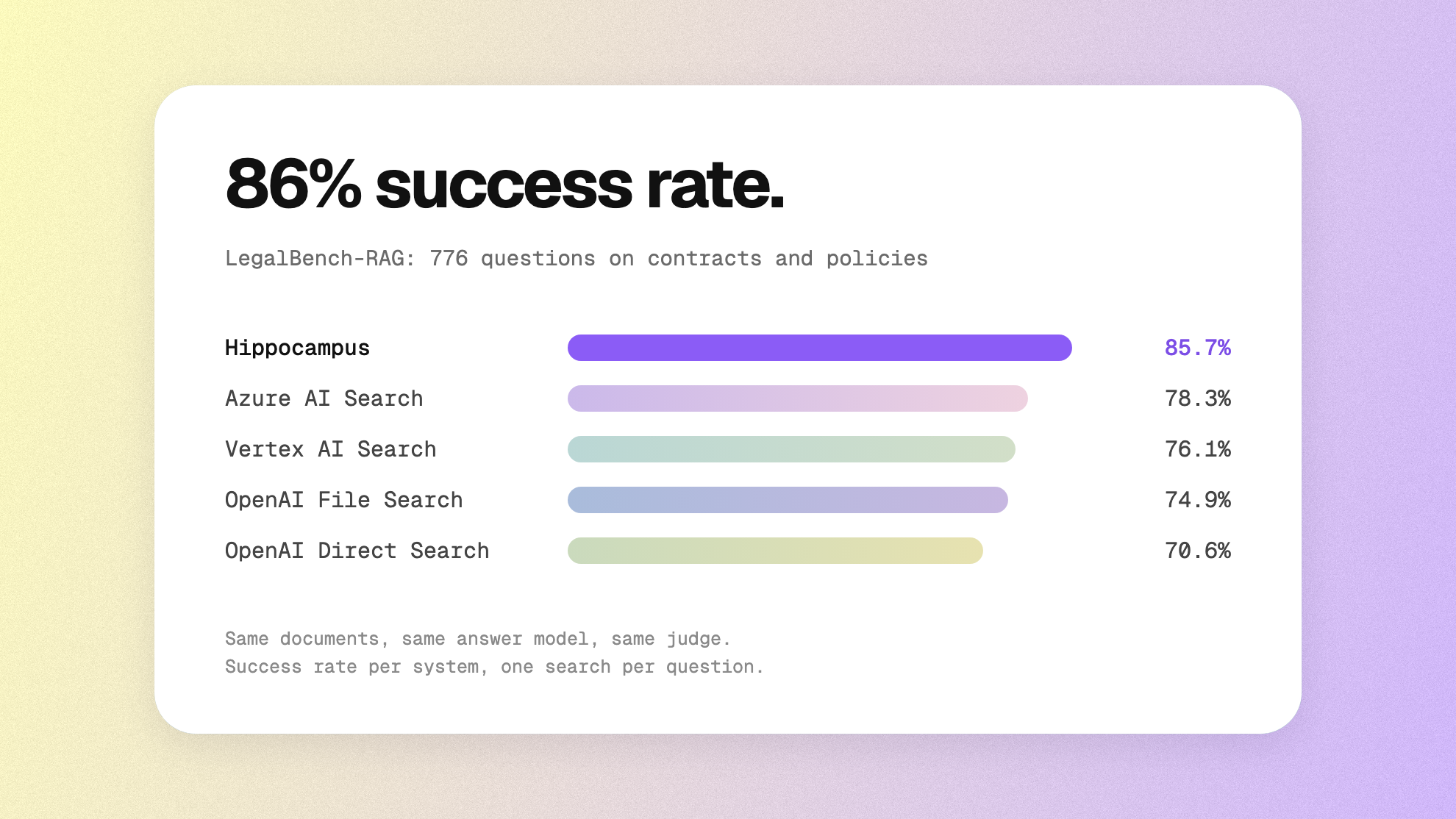
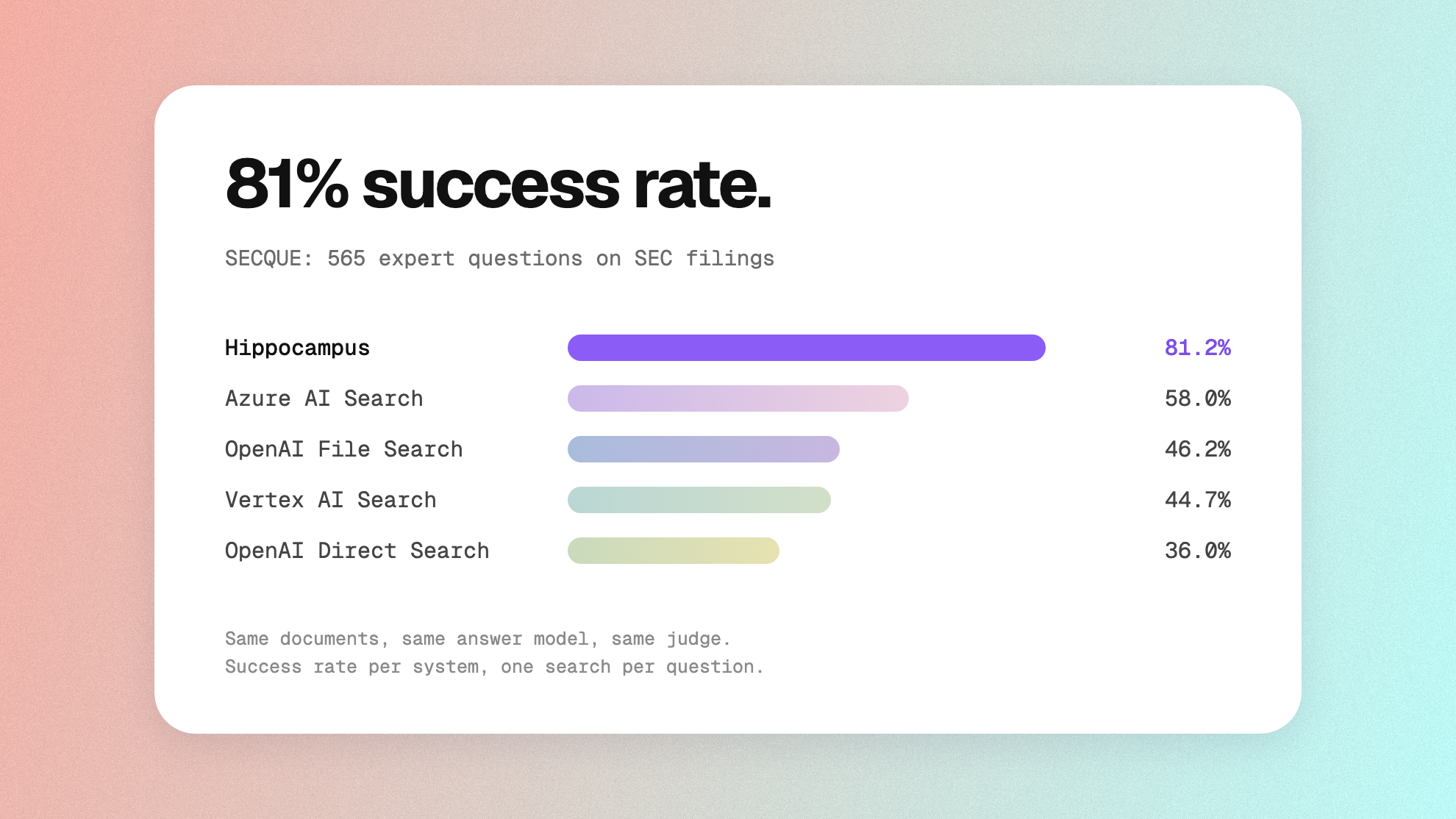
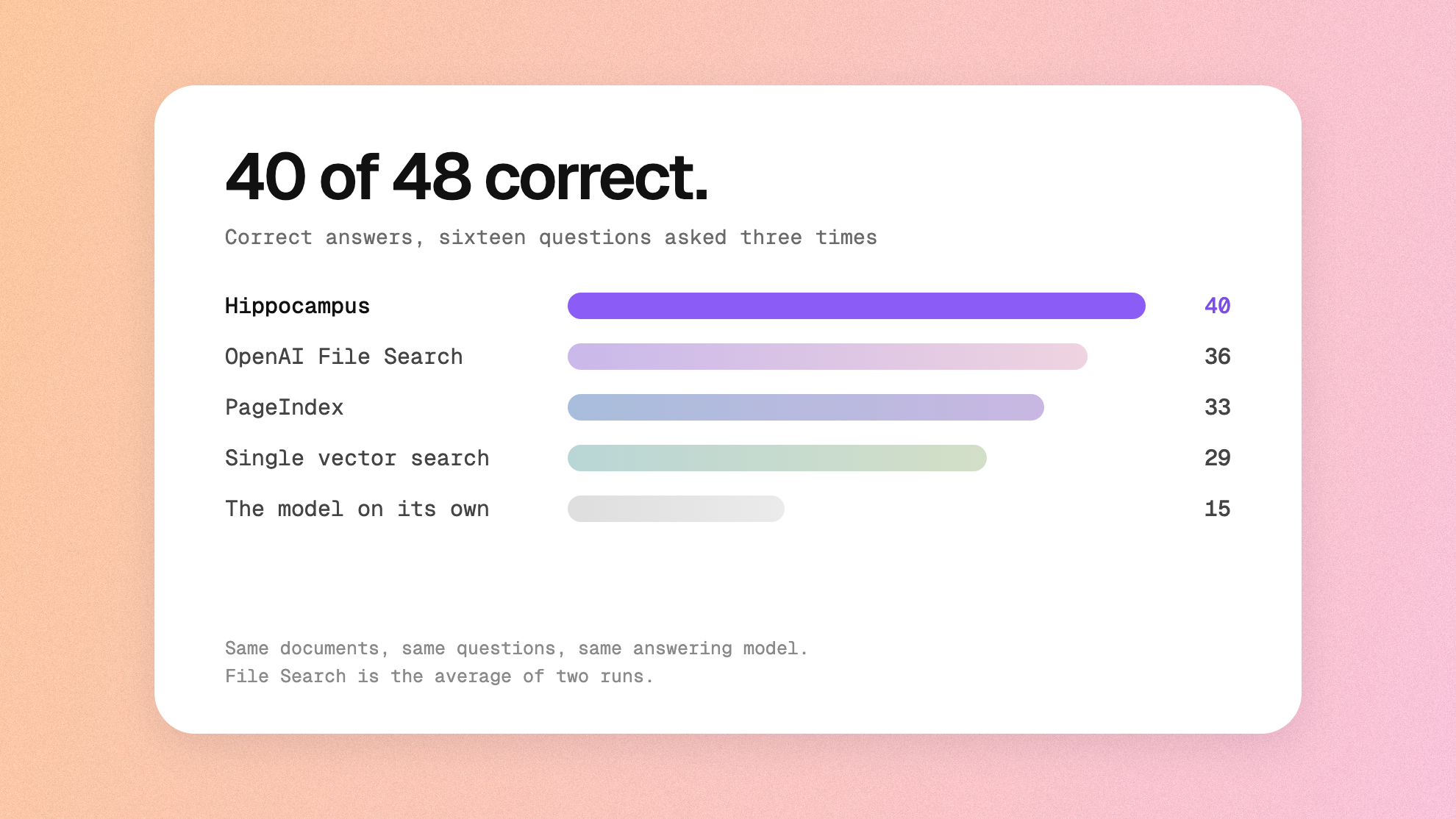
Questions

Frequently asked

How do I call the Hippocampus API?

A workspace admin creates an API client under Manage → API clients. Your program exchanges its id and secret for a token and calls https://hippocampus.thalius.ai/api/v1: POST /search for passages, GET /folders to browse, POST /ingest to add a document and GET /jobs/{job_id} to follow it. The endpoints and examples are on the API page.

What does MCP support mean?

Hippocampus runs an MCP server, so Claude Code, Codex, other agents and chat assistants can search your documents, open folders, documents and sections, read their exact text and add files in the middle of a task. It speaks streamable HTTP and signs clients in with OAuth, so no token is pasted into the client. The address is shown in the app under Connect to your AI, and the setup for each client is on the MCP page.

Which models can answer?

Hippocampus works with any language model. You choose which model answers, set per workspace, and in the web chat a person can pick the model per question. On Corporate you can use your own model key. Changing the answer model needs no re-import. The embedding model is fixed for a workspace, because changing it would invalidate the stored vectors.

Which file formats can I import?

You can import PDF, Word (.docx), PowerPoint (.pptx), Excel (.xlsx), Markdown (.md, .markdown) and plain text (.txt, .text). PDFs go through text recognition with page markers, so scanned pages work, and the original is kept; .docx converts straight to Markdown; .pptx and .xlsx are read and converted to Markdown; Markdown and text are read as they are, with page markers added. A file that was already imported is flagged as a duplicate.

What does an Open Knowledge Format export contain?

Every document is a folder of Markdown with YAML front matter: a summary of the whole document, the full text, the original file, and a folder per section down to the leaf sections. The layout follows the Open Knowledge Format specification, and any document's Markdown can be read through the API. The knowledge base can be exported at any time while the account is active.

What does a search return?

Each result carries the document title, the section, the start and end page and the passage text; over MCP it also links to the exact place in the source. Citations come from the search, never from the model, and when the documents do not cover a question the answer says so instead of guessing.

Are there API rate limits?

Yes, API requests are rate-limited per plan, and the service enforces the limit. The limits themselves are not published; load beyond them needs a written agreement with us.

Don't believe us. Test it.

Free to start. No card and no sales call.